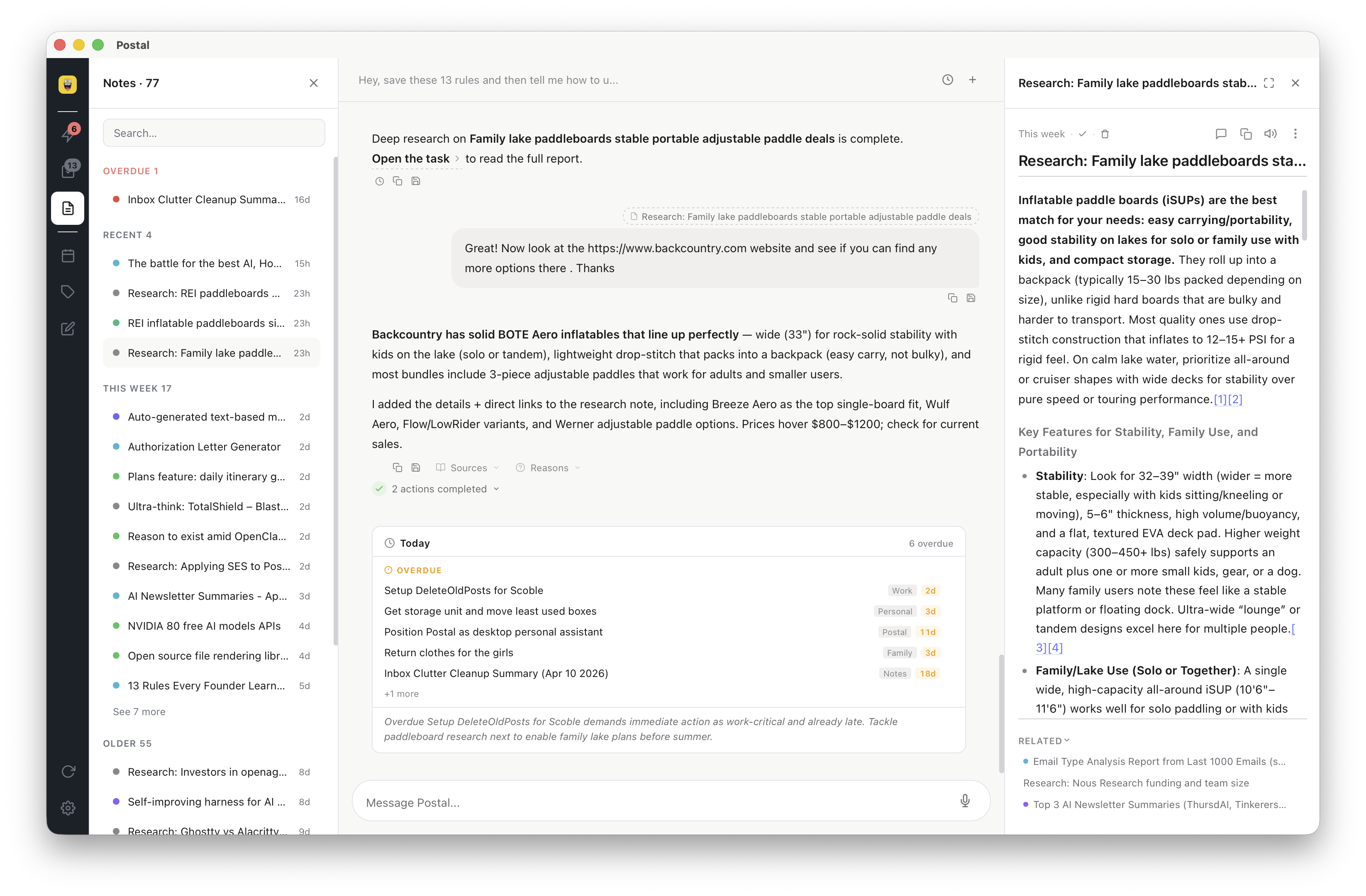
Postal on your Mac, not in a tab

Desktop is the same Postal you use on the web — chat, tasks, notes, calendar, memory — running as a native Mac app. Faster, always on, and the way coding agents get a real inbox.

Postal running as a native macOS app: chat on the left, tasks in the center, calendar on the right

Same product as the web app

Sign in and you are looking at the same board. Desktop is not a cut-down companion, and the web app is not a preview. One account, one cloud source of truth, two shells.

Chat that does work

Grok in the column: capture, research, Morning Postal, calendar, memories.

Tasks and notes

Markdown notes, lists, due dates, reminders, labels — identical to app.postal.wtf.

Calendar

Google Calendar sits next to what’s due. Schedule from chat or from a task.

Sync

Signed in, Supabase is source of truth. Edit on the phone, pick it up on the Mac.

Why run it natively

The web app is a full Postal. Desktop is that product without browser chrome, tab discarding, or “I’ll open it later.”

Performance

A dedicated window instead of a tab fighting forty others. Cold start is an app, not a reload. Scrolling the board and the note editor stay snappy because the shell is native (Tauri), not another Chrome process.

Always on

Reminders ring even if Safari is quit. The CLI can wake Postal to drain captures into the cloud. File changes from agents show up in about a second. A discarded browser tab cannot do any of that.

On-device extras

Voice dictation with a local Whisper model — audio never has to leave the Mac. Native notifications. Deep links (postal://). Optional local vault if you want files on disk and no account.

A CLI for your agents

Open a workspace and Postal installs ~/.local/bin/postal. Tell Grok, Claude Code, Cursor, or Copilot to capture with that command, and the item lands on your board — then on the web, once desktop is there to sync. How the CLI works →

Agents work with you, not in a side chat

Coding agents are already in your terminal. With desktop + CLI they can write into Postal the same way they write files — no plugin, no extra API key.

Any agent that can run a shell command
postal --type task --due 2026-08-22 "Ship the desktop page"

Paste a short rule into CLAUDE.md, Grok instructions, or .cursorrules. Full copy-paste snippets live on Agents. The CLI page covers the desktop requirement for cloud sync.

Desktop FAQ

Is this a different product from the web app?

No. Same features, same account, same data when you are signed in. Desktop is the native Mac shell: performance, reminders, voice, filesystem, and the CLI.

Can I use only the web app?

Yes. app.postal.wtf is full Postal. Add desktop when you want the native window, or when you want agents capturing through the CLI.

What about Windows or Linux?

macOS is the supported desktop today (Apple Silicon and Intel). Linux ships an arm64 AppImage on the download page. Windows is on the roadmap — use the web app until then.

How do I get the Mac app?

Download the DMG from the homepage — Apple Silicon or Intel. Opening a workspace also installs the postal CLI at ~/.local/bin/postal.

Start on the web. Add the Mac when you want native.

Free forever with your own key. Desktop is the same product, closer to the metal.