AI task manager: the 7 best tools in 2026 — and what actually matters

Every to-do app added "AI" this year. Most of it is autocomplete with a sparkle icon. Here's a working definition of what an AI task manager should do, and an honest comparison of seven tools — including where ours isn't the right pick.

The four levels of "AI" in a task manager

When you're evaluating tools, sort every AI feature into one of these levels. The gap between level 1 and level 4 is the whole game.

Level 1: Autocomplete

Natural-language dates ("tomorrow at 3"), suggested subtasks, summaries. Nice. Not why you're here.

Level 2: Organization

The AI files things for you — labels, priorities, projects — so a brain dump of ten mixed thoughts becomes ten sorted items without you touching a dropdown.

Level 3: Memory

The tool remembers context across weeks. "What did I decide about the pricing page?" is a question, not an archaeology project. This is where most tools stop — memory that sits there.

Level 4: Action

The AI does things: schedules the event on your real calendar, researches the task and writes the note, gets written to by your other AI tools. Ask one question of any vendor: does the AI act, or does it just suggest?

The 7 best AI task managers in 2026

1. Postal — best AI-native task manager for individuals

Levels 1–4

Postal (yes, this is our product — judge the claims, not the byline) is built AI-first rather than AI-added: chat is the front door, and the AI captures, labels, remembers, and acts. Brain-dump ten thoughts by voice and confirm ten sorted tasks. Ask for research and get a written note. Say "schedule it Thursday" and it lands on Google Calendar. Two things no one else on this list does: living memory that carries context across conversations, and a CLI + Markdown-file architecture that lets coding agents like Claude Code capture tasks with one shell command.

Pricing: free forever with your own key; optional managed AI later if you want it.
Skip it if: you need team assignments and shared projects today, or auto-scheduling is your #1 problem — see Motion.

2. Motion — best for automatic calendar scheduling

Motion's bet: your task list should live on your calendar, and software should play the tetris. Give it tasks, deadlines, and priorities and it builds your day, rescheduling automatically when a meeting lands on your deep-work block. Best-in-class at exactly that. Skip it if your problem is capture and memory rather than scheduling — it's a per-seat subscription aimed increasingly at teams, and its notes/knowledge side is thin. Full breakdown: Postal vs Motion.

3. Reclaim.ai — best for defending time on Google Calendar

Less a task manager, more a calendar bodyguard: habits ("gym, 3× a week"), task blocks, and smart buffer time, all defended automatically on Google Calendar. Pairs well with a real task system. Skip it if you want one tool — it expects your tasks to live somewhere else.

4. Todoist — best classic to-do list with AI sprinkled in

The most polished traditional to-do app: fast capture, natural-language dates, every platform, twenty years of reliability. Its AI assistant suggests and rephrases — level 1–2 on the scale above. Skip it if you want AI at the center rather than the edges; that's the gap we built Postal to close.

5. Notion — best if your tasks live inside documents

If your team already writes everything in Notion, its databases plus Notion AI give you capable task tracking next to the docs. The AI is strongest at writing and Q&A over your pages. Skip it if you want a fast personal task app — a database of everything is also a to-do list of nothing in particular.

6. TickTick — best all-in-one planner

Tasks, calendar view, habits, and a pomodoro timer in one inexpensive app, with light AI assistance. A lot of tool for the money. Skip it if memory and agents matter — there's no story there.

7. ChatGPT tasks — best if you refuse to install anything

ChatGPT can hold reminders and scheduled check-ins now, and for a handful of items it works. There's no board, no labels, no calendar integration, and your tasks live inside a chat log. Best as a taste of chat-first task capture before you adopt a real system.
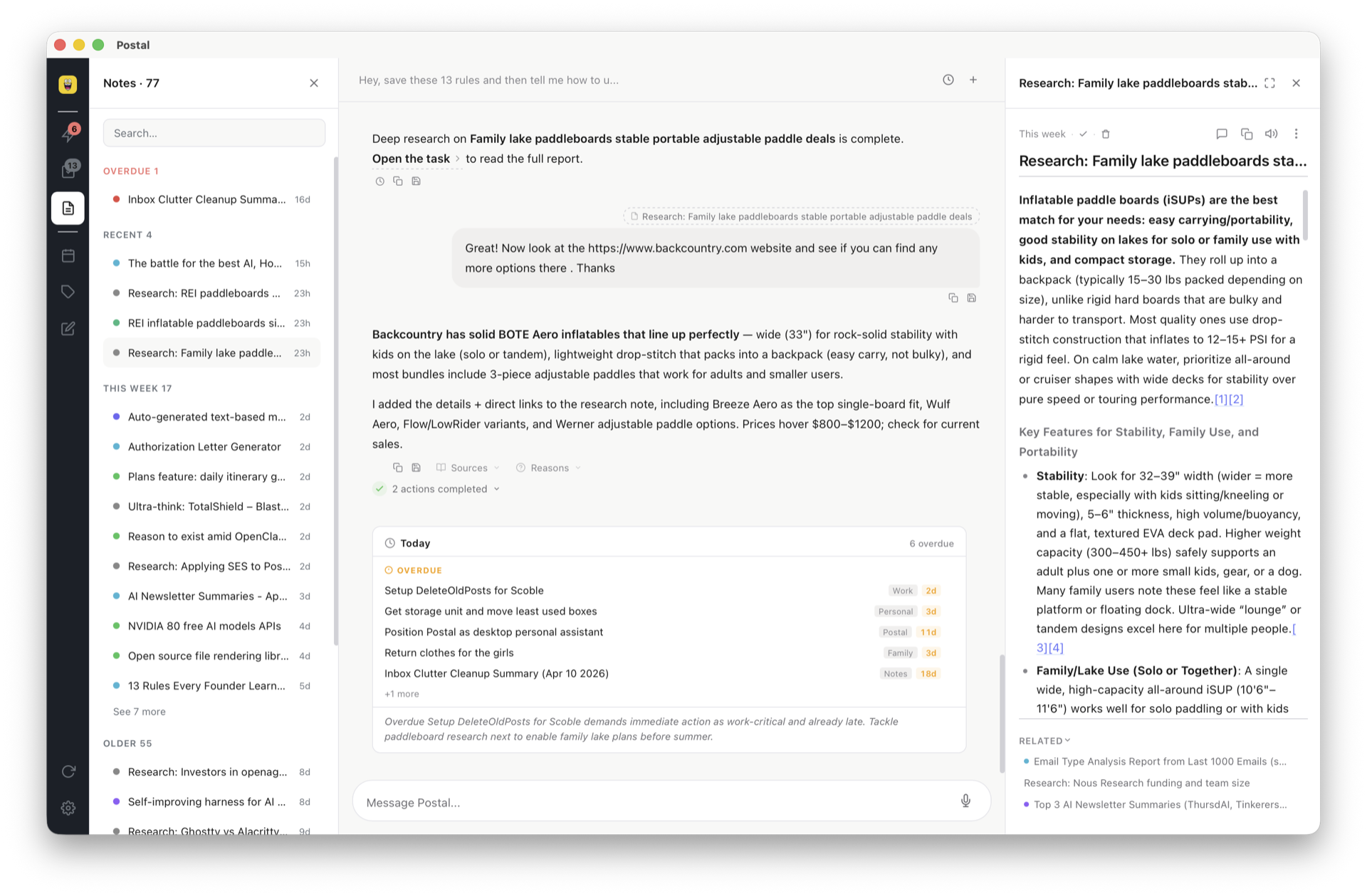
Postal's chat capturing a brain dump and turning it into labeled tasks, shown next to the resulting task board

At a glance

Tool AI level Strongest at Agent/CLI access Free path
Postal 1–4 (acts) Capture, memory, agents Yes — CLI + Markdown files BYOK free forever
Motion Acts (scheduling) Auto time-blocking No Trial only
Reclaim.ai Acts (calendar) Defending time No Free tier
Todoist 1–2 Classic to-do polish API only Free tier
Notion 1–3 Tasks inside docs API only Free tier
TickTick 1 Planner value No Free tier
ChatGPT tasks Chat only Zero setup No Free tier

Frequently asked questions

What is an AI task manager?

A to-do app where AI does real work: capturing tasks from natural language or voice, organizing and labeling automatically, remembering context across weeks, and taking actions — scheduling calendar events, researching a task for you. The bar: does the AI act, or just autocomplete?

What is the best free AI task manager?

Postal has a genuinely free path: bring your own API key and everything works free forever — you pay your AI provider at cost, typically a few dollars a month. Most competitors gate AI behind a subscription; Todoist and TickTick have good free tiers but with AI limited or absent.

Is Motion worth it compared to other AI task managers?

If your core problem is calendar chess, yes — Motion's auto-scheduling is best-in-class. If your problem is capture, memory, and tool sprawl, an AI-native workspace fits better. See the full Postal vs Motion comparison.

Can an AI task manager work with coding agents like Claude Code?

Postal is the only tool on this list built for it: tasks are Markdown files, and a CLI lets Claude Code, Cursor, or any script capture tasks with one command. Here's the 2-minute setup.

Do I need an AI task manager or just a to-do list?

If a simple list works, keep it — the best system is the one you check. AI earns its place when things fall between tools: ideas in chats that never become tasks, notes that never resurface, follow-ups that depend on your memory.

Try the level-4 one

Postal captures, remembers, and acts — and your coding agents can write to it. Free forever with your own key, or $20/month for managed AI.

Get started free